
Unknown to many users of Apple's GarageBand software, you CAN in fact use a third-party control surface to control GarageBand. We'll show you how.
Before you start, you should know that it will only work with control surfaces that are supported by Logic Studio. This includes Mackie Control, Tascam US-2400, Korg microKONTROL, C.M. Labs Motormix, and more.
The first thing you need to do, is download and install GarageRemote. GarageRemote allows the control of GarageBand's transport functions from any MIDI controller that has programmable buttons. After you install it, you need to follow the directions and set-up your controller to use the same transport control codes as GarageBand. I suggest using the default mapping if possible.
Secondly, download this file. Once you have downloaded it, use an application such as The Unarchiver to extract the folder 'MIDI Device Plug-ins'.
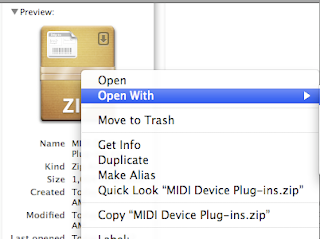
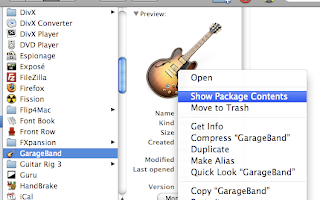
Right-click or ctrl-click on the folder and select 'copy "MIDI Device Plug-ins"'. Then navigate to Applications>GarageBand, and right-click/ctrl-click on the GarageBand app icon, and select 'Show Package Contents
'.
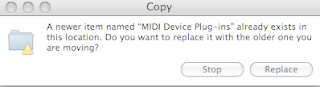
Right-click/ctrl-click on the folder named 'Contents', and select 'Paste Item'. A message will pop up stating 'A newer item named "MIDI Device Plug-ins" already exists in this location. Do you want to replace it with the older one you are moving?". Choose 'Replace'.
Open GarageBand, and PRESTO! you are now able to use your control surface.
Enjoy!
